
By Derek V. Mackown | IT Technician & Display Hardware Specialist
You just bought a monitor. Maybe you saved up for it. Maybe it’s the nicest display you’ve owned. You set it up, you turn off the lights, you open something dark. A game, a movie, a black wallpaper and you see it.
Bright patches. Light leaking around the edges. A weird glow in the corners that makes the screen look like it’s lit from behind in all the wrong places.
And your first thought is: did I get a defective unit?
Maybe. Maybe not. It depends entirely on what you’re actually looking at, because there are two different things that look almost identical, and they have completely different causes and completely different answers. One of them is a manufacturing defect that might be worth a return. The other is just… how IPS monitors work. Every single one of them.
I want to help you figure out which one you have. It takes about five minutes.
The Quick Way to Tell Them Apart
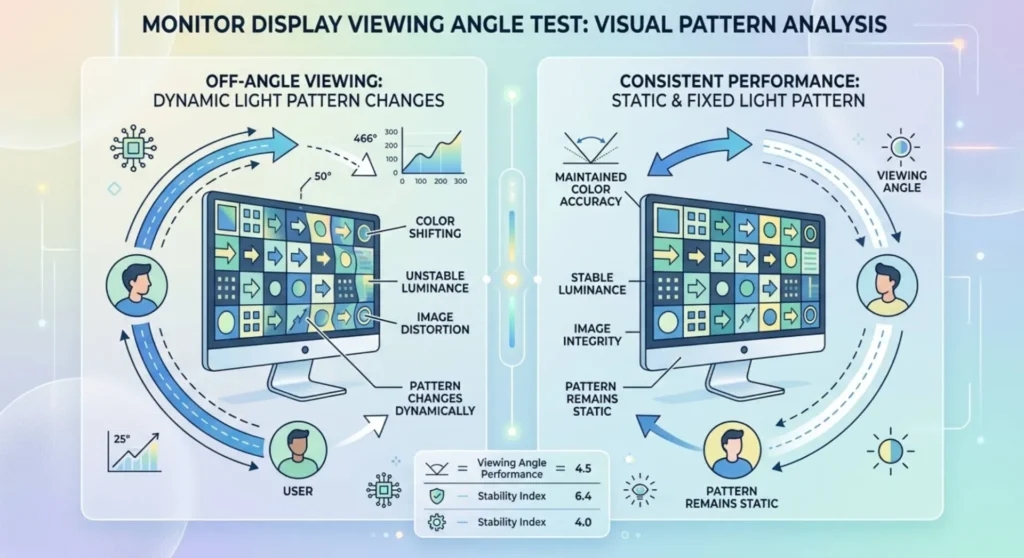
Turn off every light in the room. Open a pure black full-screen image on your monitor, a black browser tab in full screen (press F11) works fine. Let your eyes adjust for about a minute.
Now look at where the bright patches are, and do one thing: slowly move your head from side to side while watching the bright areas.
If the glow shifts, moves, or changes intensity as your head moves, that’s IPS glow. It’s reacting to your viewing angle.
If the bright patches sit completely still no matter how much you move around, that’s backlight bleed. It doesn’t care where your eyes are.
That’s the whole test. That’s how you tell them apart. Everything else follows from this.
IPS Glow – The One That’s Not a Defect
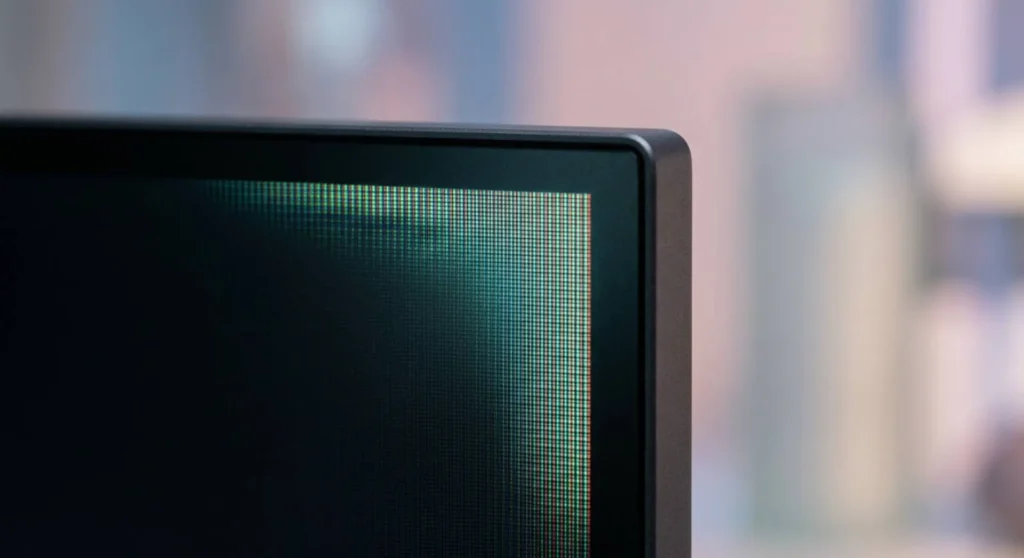
IPS glow exists on every IPS monitor ever made. Every single one. If someone tells you their IPS monitor has zero glow, they’re either not looking carefully enough or they haven’t tested it properly.
Here’s why it happens in plain terms: the backlight inside an LCD monitor is always on. It has to be unlike OLED, LCD can’t turn individual pixels off. The liquid crystals in the panel block that backlight for dark pixels, but they can’t block it perfectly, especially when light is hitting them at an angle. When you look at the corners of your screen, you’re viewing those pixels at a slightly different angle than the center. That angle lets a little more light through. You see it as a soft, slightly colored glow often greenish or bluish that shimmers a little.
It’s not broken. It’s physics.
What moves when your head moves is the angle. Change the angle, change how much light sneaks through. That’s why IPS glow is always worst in the corners farthest from your direct line of sight. Sit a little to the left and the right corner glows more. Sit centered and it evens out.
Can you reduce it?
A little. Lower the brightness, glow is dimmer at 60% brightness than 100% brightness, obviously. Add some ambient lighting behind the monitor (a bias light strip behind the panel) so the dark environment that makes glow visible isn’t quite as dark. Sit more centered relative to the screen rather than off to one side.
But you cannot eliminate it. No setting, no update, no physical tweak removes IPS glow. If you bought an IPS monitor and this is what you’re seeing, soft, shifts when you move, slightly colored, worst in corners, this is what you bought. It’s the trade-off for IPS’s excellent color accuracy and viewing angles compared to other panel types.
A more expensive IPS panel will have less of it. But it won’t have none of it.
Backlight Bleed – The One That Might Actually Be a Problem
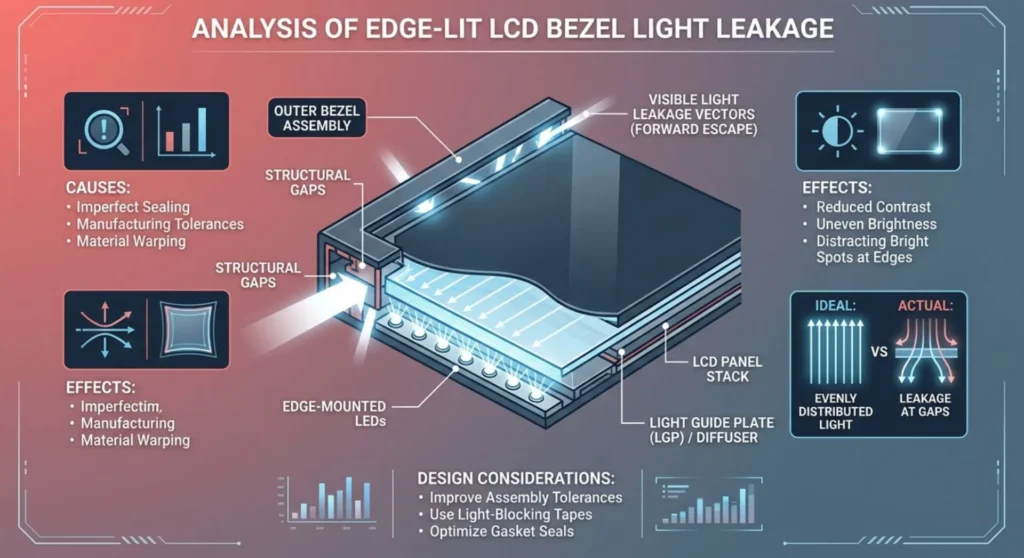
Backlight bleed is different. This one can genuinely vary between units, can genuinely ruin your experience, and genuinely can be grounds for a return if it’s bad enough.
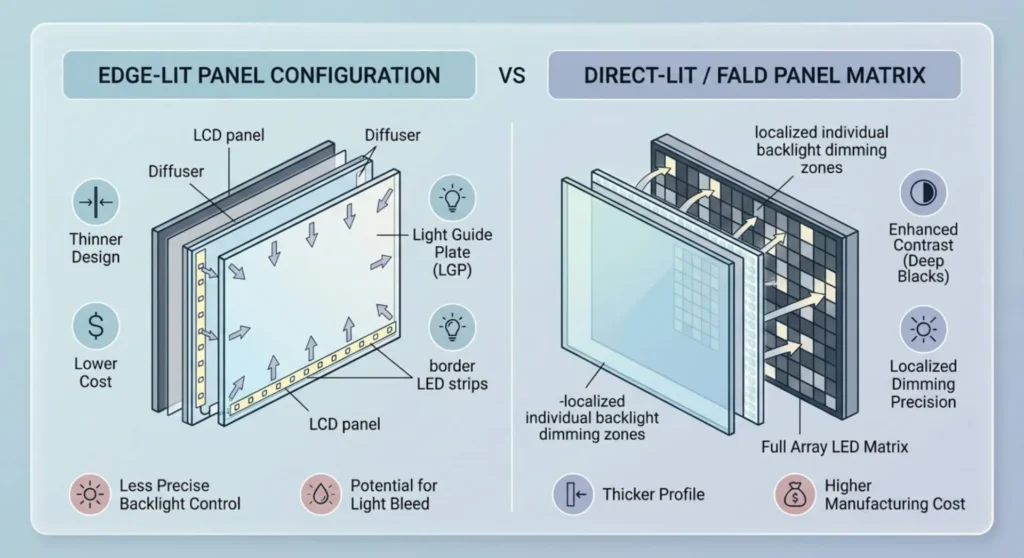
Here’s what’s happening: LCD monitors typically have LED lights along the edges. The bottom edge, sometimes all four edges. Those LEDs shine into a diffuser that spreads the light evenly across the whole panel. But the edges where the LEDs are closest are the brightest, and if the frame holding everything together has any gaps at those edges, light leaks through forward rather than spreading properly. You see it as bright white patches near the bezel.
The key things about backlight bleed that make it different from glow:
It doesn’t move when you move. It’s the same no matter what angle you view from. It’s white or near-white, not colored. And it varies from unit to unit, two identical monitors from the same production run can have completely different bleed. One might be barely noticeable, the other might have a bright patch in the corner that ruins dark movie scenes. That variance is why it’s a quality control issue, not just how monitors work.
What You Can Actually Do About Bleed
First, give it time. Seriously. New monitors sometimes have mild bleed that improves in the first few days as the internal components settle and any slight expansion from shipping stress normalizes. Don’t make a return decision on day one.
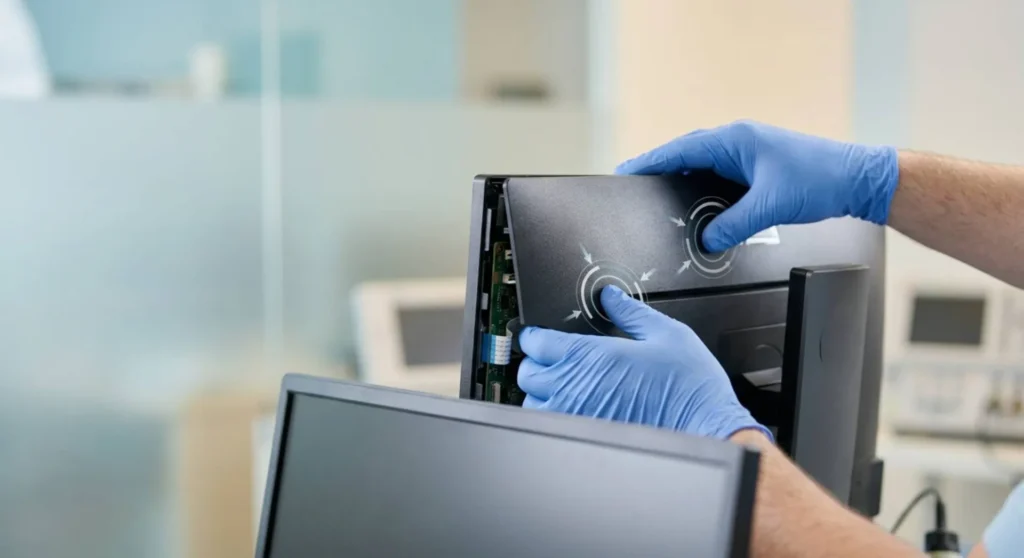
The back-pressure trick. This sounds strange but it works on mild bleed. Turn the monitor off. With both hands, press firmly and evenly on the back of the monitor housing, not the screen. The back panel and hold for 30 to 60 seconds. Then turn it back on and check. What you’re doing is pushing the frame layers into slightly better contact with each other, closing the gap that light was escaping through. It’s not a permanent fix, but it often reduces bleed noticeably and gives you a better sense of whether this unit is worth keeping.
If the bleed improves with pressure, it’s a mechanical issue with the housing assembly, the kind of thing that can often be improved further.
Reduce brightness. Backlight bleed is brighter when the backlight is brighter. Running the monitor at 60-70% brightness instead of maximum reduces how visible the bleed is during actual use, even if the dark-room test still shows it clearly.
Tighten the housing screws. If you’re comfortable with this and the monitor is out of warranty, lay it face-down on a soft surface and try gently tightening the rear housing screws near the bleedy edges. A quarter turn at a time. Check between adjustments. On some monitors this helps a lot. On others it does nothing. Never force it.
The tape method. On monitors with bleed concentrated on one edge, a thin strip of matte black electrical tape placed between the bezel and the panel glass, accessible by gently flexing the bezel away from the glass without fully removing it and acts as a light blocker at the gap. It’s fiddly, it’s an enthusiast-level modification, and it can go wrong if you’re not careful. But when it works, it works permanently.
When to Keep It and When to Send It Back
This is what you actually want to know, so I’ll be direct.
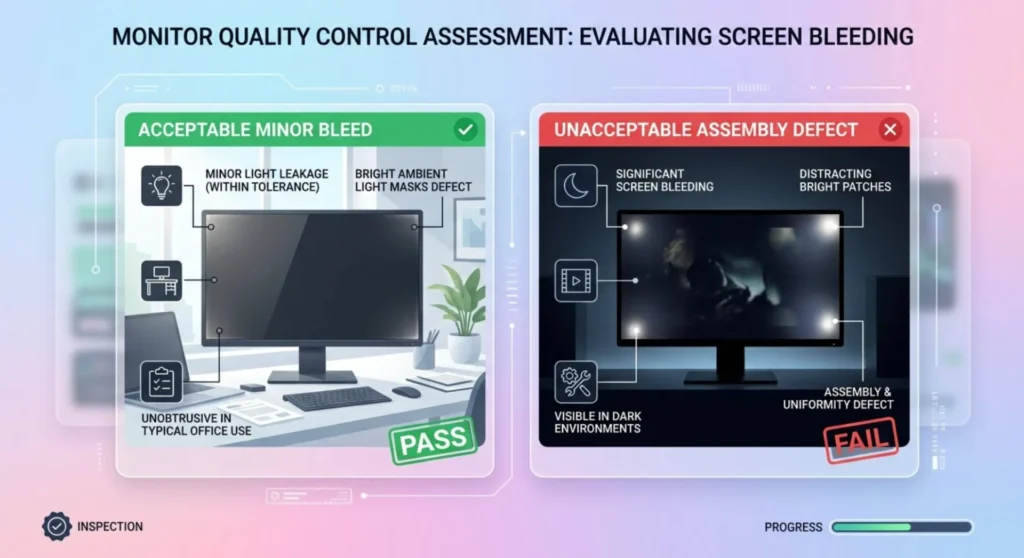
Keep it if: the bright areas only show up in a completely dark room with a pure black screen, and during your actual use, games, movies, work, you don’t notice them. Almost every monitor has some level of bleed that looks alarming in isolation but disappears the moment you’re watching real content. If it doesn’t bother you when you’re actually using the thing, it’s not a real problem.
Return or exchange it if: you can see the bleed during normal use. Dark scenes in games, night sky in movies, dark UI backgrounds. If a bright patch in the corner is distracting you while you’re watching something, that’s a legitimate complaint. That’s the monitor failing to do its job.
Also worth trying an exchange if: the bleed is heavily concentrated in one specific area, especially if it’s bright and unresponsive to the back-pressure trick. That’s usually a housing assembly issue on that specific unit, and another copy of the same model might be significantly better.
One important thing about returning it: don’t say “IPS glow” to the manufacturer or retailer if you’re making a return claim. Some manufacturers will tell you IPS glow is normal and deny the return. Because they’re right that it’s normal. Say “backlight bleed affecting content viewing.” That’s the specific defect you’re claiming, and it has a better chance of being accepted.
If You’re Still Not Sure Which One You Have
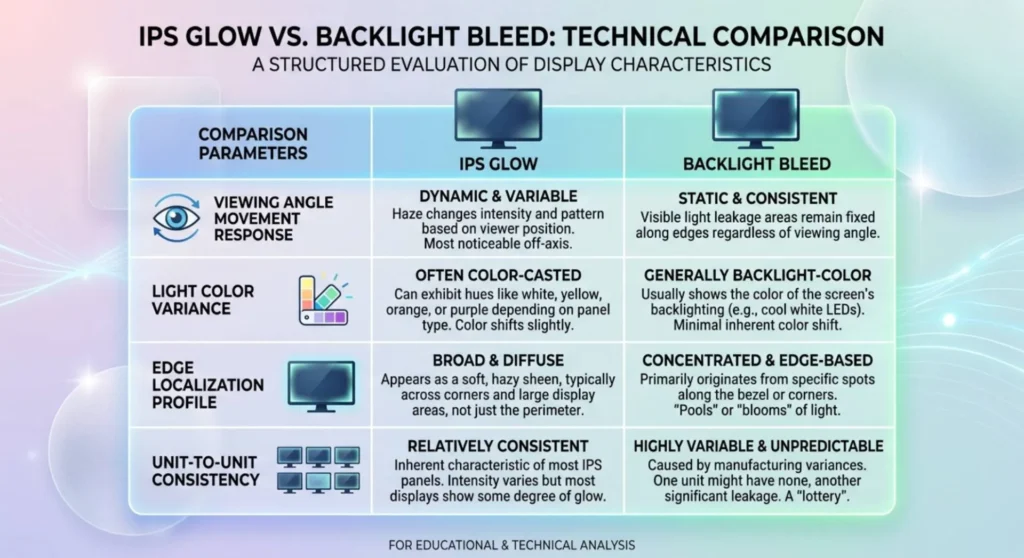
Here’s a simple table. No long explanations, just the quick reference.
| IPS Glow | Backlight Bleed | |
|---|---|---|
| Moves when you move your head | Yes | No |
| Color | Slightly tinted (greenish, bluish) | White or neutral |
| Edge quality | Soft, fades out gradually | More defined, brighter |
| Where it appears | Corners, sometimes edges | Near bezel on one or more edges |
| Same on every unit of the model | Basically yes | Varies – some units worse than others |
| Defect? | No | Can be |
| Worth returning for? | No | Yes, if bad |
Shopping Smarter Next Time
If you’re reading this before you buy or after you’ve already dealt with one bad monitor and want to avoid it again, a few things that actually help.
Check rtings.com for your monitor’s dark uniformity score before buying. They measure it in a controlled way and give it a percentage. Below 1.5% is excellent. Above 3% and you’re likely to see bleed during dark content. This number is more useful than any review opinion because it’s an actual measurement.
Edge-lit monitors bleed more than direct-lit monitors. Most consumer monitors are edge-lit. If backlight uniformity is a priority, especially for movie watching or dark game environments. Look for direct-lit panels or monitors with full-array local dimming, which can selectively dim zones of the backlight.
VA panels don’t have IPS glow. The physics are different, VA crystals block light much more effectively at off-axis angles, so the glow phenomenon doesn’t occur. VA panels do have their own downsides (motion blur in fast dark scenes), but if you primarily watch films and work with documents rather than play fast-paced games, VA will give you far better dark performance than IPS.